
Pre-send scan
Checks what you paste or type on 16 AI chat sites, and again when you press Enter or click Send.
Data Guard checks the text and files you are about to share with an AI chatbot, right on your device, and helps you send a safe version. Watch the walkthrough, then try the live demo below.
js/config.js and set video to a YouTube link or a file in assets/.
Open the working app in a new tab. Press Sample resume to see what it catches, then Sample homework to see it stay quiet when there is nothing to protect. You can also drop in a PDF or DOCX file.
Everything in the app runs on your device. Your text is never sent anywhere, and the app keeps working with the internet off.
The app link is not set yet. Open js/config.js and set app to the address where you host the app.
Names, email, phone, address and Banner ID are highlighted and scored.
Swap each item for a token such as [NAME_1], or generalize it.
Paste it into any AI. Paste the reply back to restore your real details.
People paste resumes, transcripts, essays and medical notes into AI chatbots every day, and those texts often hold home addresses, phone numbers, student IDs and other people's private details. Data Guard adds a quick checkpoint that keeps all of it on your device.
Checks what you paste or type on 16 AI chat sites, and again when you press Enter or click Send.
A 10 MB model finds names with no server. Rules then double-check each one.
Dates, IDs and names are flagged only with context, so homework passes clean.
A 0 to 100 score with a plain reason for every flag.
Swap a name for [NAME_1], shorten an address to "Albuquerque, NM", or keep it.
Your real details are put back into the AI's reply, on your device only.
PDF, DOCX and TXT files are read and checked on your device before they upload.
Switch on airplane mode and it keeps working. The app counts requests to other sites: always 0.
No accounts, no tracking, no server. Optional encrypted vault and clipboard clearing.
Detection lowers the risk but cannot catch everything. Unusual names and scanned (picture-only) PDFs can slip through, so always check the safe text before you send it.
It works inside ChatGPT, Claude, Gemini, Copilot, Perplexity and more, and asks for almost no permissions.
chrome://extensions and turn on Developer mode.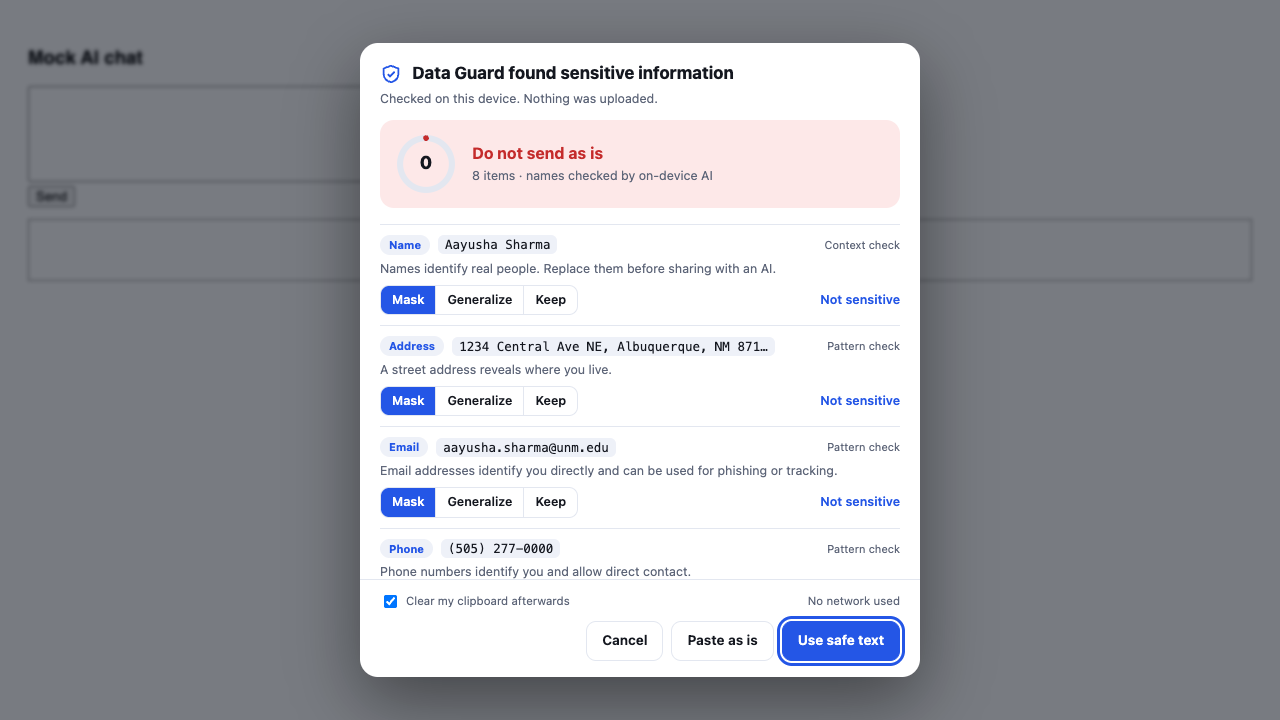
Prototype build for judges and testers. A Chrome Web Store listing is planned.
Two University of New Mexico students bringing engineering, design and care for real people together.
Developer
Studying Computer Science with a minor in Mathematics. Loves hackathons: CalHacks, the Lobo Hackathon, the NASA Space Apps Challenge and the UNM App Contest. Builds creative, practical software.
Business Developer & Designer
Studying Nursing with a minor in Business. Works as business developer and designer, shaping the strategy and the user experience, and keeps the work focused on protecting real people.